
Features
Everything CortenDesk does
One container runs the RustDesk ID server, the relay, the web console and a browser client. Here is what you get, roughly in the order you meet it.
Devices
Your whole fleet on one screen
Machines register the first time a client points at the console. Device groups work as folders and as the unit of access control.
- Presence, platform, client version, owner and last seen
- Pick your own columns (CPU, memory, IP, LAN IP, UUID) and export the view to CSV
- Select rows to delete them or add them to an address book
- Pre-register an ID before the machine is built, or hold new devices for approval
- Possible duplicates flagged after a reinstall or a cloned image
- Connect, open a terminal or start the web client from the row
- A recycle bin, so a deleted device stays deleted until you restore it

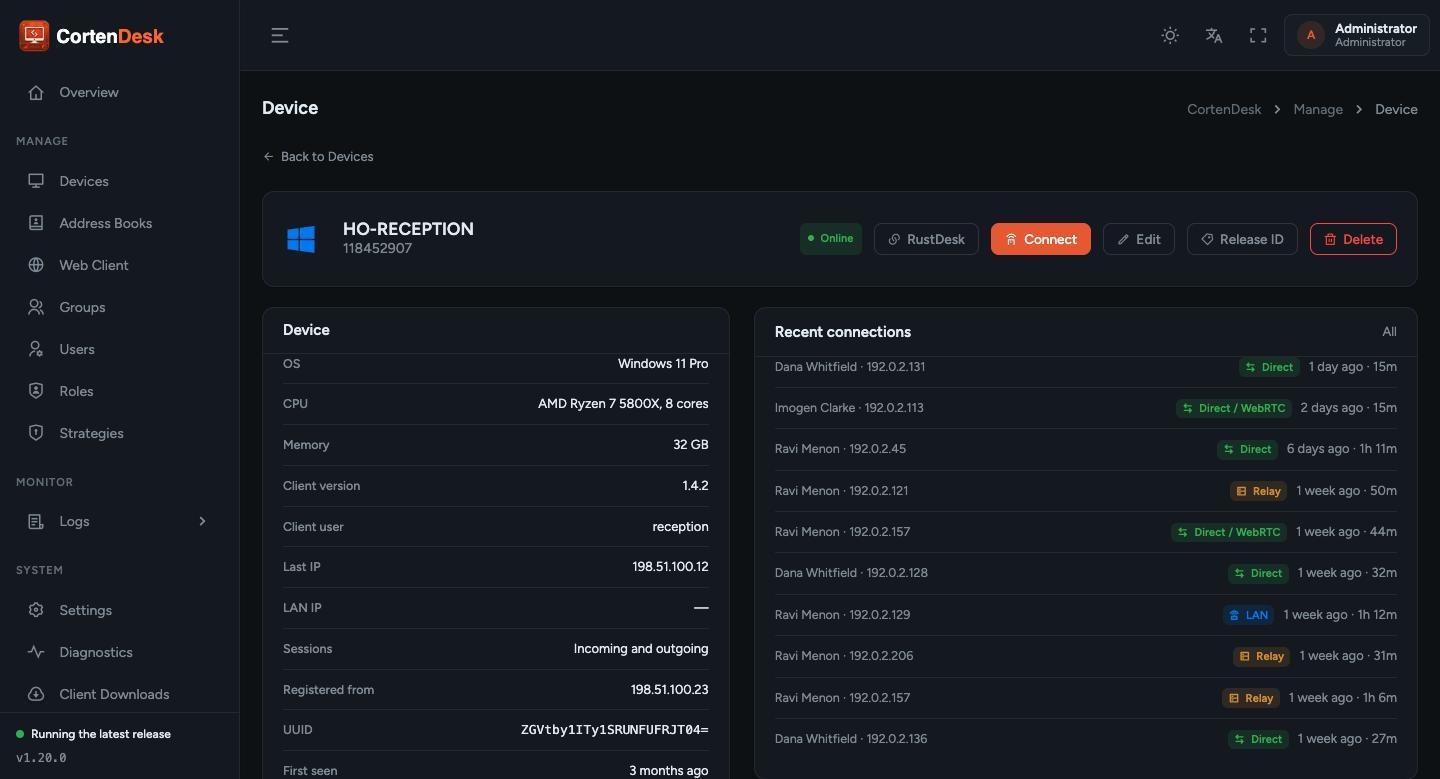
Device page
Everything about one machine
Hardware, the client's version and user, where it registered from, and its recent history, each linking into the full log.
- Recent connections with how each one got through, and the session notes
- File transfers, alarms and notifications for this device
- Which address books carry it, editable in place
- Release ID: free its ID so a reinstalled machine can take it back
Built-in server
The ID server and relay come with it
The image runs CortenDesk Server, our fork of rustdesk-server, next to the console. The two talk to each other, so the server enforces what you set in the console.
One container
hbbs and hbbr ship in the image. Already running them? Bring the old key pair and every device keeps its ID.
Approved devices only
Only devices you approved can register or connect. Unknown ones wait as pending, and can be approved when their user signs in.
Incoming only
Mark a device so it can be controlled but can't start sessions. New devices can start out that way.
A home for new devices
New devices land in a default group, so the right people see them straight away.
ID whitelists by group
A strategy can limit who may connect to a device, by ID or by whole device groups that follow their membership.
Release an ID
Free a device's ID on the server from its page, instead of editing the server's database with it stopped.
Connections
More sessions go direct
Every path falls back to the relay when it can't connect, so nothing gets worse.
WebRTC
RustDesk 1.5 devices and the web client connect peer to peer over WebRTC. Add your own TURN server for mobile and carrier networks.
UDP and IPv6
UDP hole punching and IPv6 peer-to-peer for RustDesk 1.5, through UDP 21116.
Through port 443
Desktop clients can run entirely over WebSocket through your HTTPS proxy, for networks that block the RustDesk ports.
How each session connected
LAN, direct, WebRTC or relay, on every connection and on the dashboard. Relayed sessions show how much the relay carried.
Relay bandwidth limits
Per-session and total caps for the relay, and a slowdown for long sessions. Changes apply live.
Signed-in clients connect
RustDesk 1.4.1 and newer need a key exchange stock hbbs never completes. The bundled server does it.
Web client
A full RustDesk client in the browser
Connect from any machine with Chrome or Edge, with nothing to install. It is our own TypeScript implementation of the RustDesk protocol, not a viewer, and it does what you use the desktop client for.
- Hardware video: VP8, VP9, H.264, H.265 and AV1 over HTTPS, H.264 over plain HTTP
- WebRTC straight to RustDesk 1.5 devices, with the relay as fallback
- A two-pane file manager with drag and drop, and files by copy and paste
- A terminal on Windows, macOS and Linux, from a session or straight from the device list
- Audio, voice calls, chat, clipboard both ways and every monitor
- Signs in with a password from your address book, and asks for 2FA when the device does
- Strategies still apply: what a device forbids, the browser can't do
Users and access
Who can reach what
Administrators see everything. Everyone else sees their own devices plus the device groups granted to them or to a user group they belong to.
- A page per user: their devices, address books, sign-ins, console actions and connections
- User groups, so a grant is made once
- Disable an account without deleting it; force logout ends console sessions and client tokens together

Delegated administration
Hand over one screen, not the keys
A role is a permission matrix over each console area, set to None, View or Manage. Roles decide what someone can do. They never widen which devices someone can see.
- Devices, users, groups, address books, logs, policies, settings and tokens
- Sign-in history and the console audit trail sit behind Manage, not View
- A role can require two-factor of everyone assigned to it

Device policies
Strategies
Client settings pushed from the console and applied on the next heartbeat. Assign to a device, a user or a device group. The most specific assignment wins, and exactly one policy is in force.
- Permissions: keyboard, clipboard, file transfer, audio, camera, terminal and more
- Security: approval mode, password rules, IP and ID whitelists, idle disconnect
- Capture and display, and the STUN and TURN servers for WebRTC
- An impact preview before you save, and a revision history after
- Compliance per device: confirmed, pending, stale, offline or overridden
- Enforce, and a change made on the device is reverted

Address books
Shared peer lists
Every user gets a personal book. Shared books go to everyone, a person or a group, as read, read/write or full control.
- Coloured tags for organising a large book
- The current multi-book API and the legacy single-book API
- A read-only book is read-only in the client too
- Saved passwords sign the web client in, as they do the desktop client

Audit
A record of what happened
Connections, file transfers, sign-ins, security alarms and console actions. All filterable and exportable to CSV.
- How each session connected: LAN, direct, WebRTC or relay
- The note a user can leave at the end of a session
- Alarms from the clients and from the console's own sign-in limiter
- Retention in days, pruned nightly
- Every record as one JSON line to the container log, for Loki, Elastic or a SIEM

Dashboard
The fleet at a glance
Devices, who is online, live sessions and alarms, with charts of connections per day and how they got through.
- Active sessions, endable by an administrator
- Platform and client version breakdowns
- Every number scoped to the devices the viewer can see

Sign-in and automation
Signing in, and scripting it
Single sign-on (OIDC)
Keycloak, Authentik, Entra ID, Okta, Google Workspace or any OpenID Connect provider. PKCE, verified ID tokens, just-in-time accounts with optional approval and an email-domain allowlist. Works for the console and for RustDesk client sign-in, and password sign-in can be turned off for both.
Two-factor authentication
TOTP with single-use recovery codes, required for everyone or for administrators only. The RustDesk client asks for the same code. Wrong codes are limited per account, with an administrator reset and a command-line way back in.
Automation API
Scoped bearer tokens over a REST API for users, devices, groups, address books and audit logs, plus the client's --assign flag for unattended deployment. A token never holds more than whoever issued it.
SMTP with a test send that reports the provider's own error. Invitations, self-service password reset, and an emailed code when signing in from a new browser.
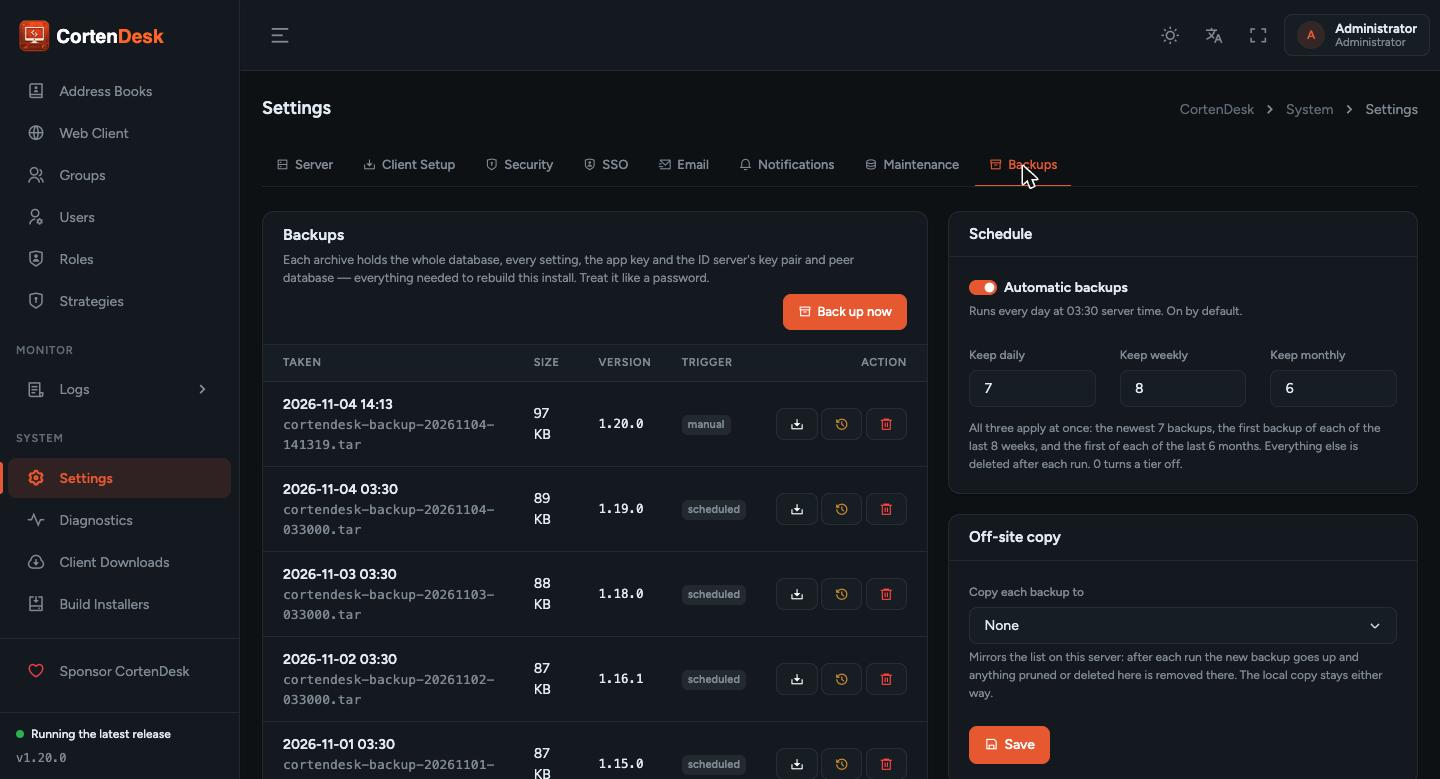
Backups
One archive rebuilds the install
The whole database, every setting, the app key and the server's key pair and peer database, in one file.
- Daily by default, keeping 7 daily, 8 weekly and 6 monthly
- Copied off-site to FTP, FTPS or S3-compatible storage
- Restore from the list, or from the command line
Notifications
Device offline and back, pending approvals, failed sign-ins, alarms and backups, to Slack, Telegram, Discord, ntfy and more through Apprise. Retries, an offline grace period and maintenance snoozes.
Fleet diagnostics
One page that answers "is everything up?", with a sanitized export to attach to a bug report.
Health checks
/health/live and /health/ready for load balancers and uptime monitors.
Client downloads
Publish your own client builds on a public downloads page and the sign-in page. A link to rdgen builds them.
Import from rustdesk-api
One command moves users with their passwords, devices, address books and history over from lejianwen/rustdesk-api.
12 languages
English, German, Spanish, French, Italian, Hungarian, Dutch, Polish, Brazilian Portuguese, Russian, Slovak and Simplified Chinese, emails and web client included.
Works on a phone
Every screen works at phone width, with dark and light themes saved to your account.
amd64 and arm64
One image on GHCR and Docker Hub, with MySQL or MariaDB.
Free, no tiers
AGPL-3.0, no license key, and no limit on users or devices.
Try it in about a minute
One container is the whole deployment: server, relay and console. Already
running hbbs/hbbr? They move in with their key pair.